Hacking Bootcamp S3: View source
Today
- Web apps
- HTTP
- Format
- Status
- Headers
- HTML
- JS
- CSS
- Known files
- Hack time!
Tools
Install please:
- httpie
- httrack
- katana
- Burp Suite
What’s a web app
Applications delivered over the wire by some server (e.g., the Internet) and executed by a web browser (e.g., Chrome, Firefox).
They are very popular nowadays and are used for much any you may want to do (e.g., calendar, mail, banking, music, video).
Web app interaction
Web applications receive input from the user, such input is processed somehow (change the GUI, send data to the server).
The client part of the web application (what runs on your browser and so on your computer) is on your control (altough most of the time it just does its thing). You can make your browser draw whatever on your screen and send anything back to the server.
Of course, the server may not respond as you wish, some other party controls its code.
Talking to the server
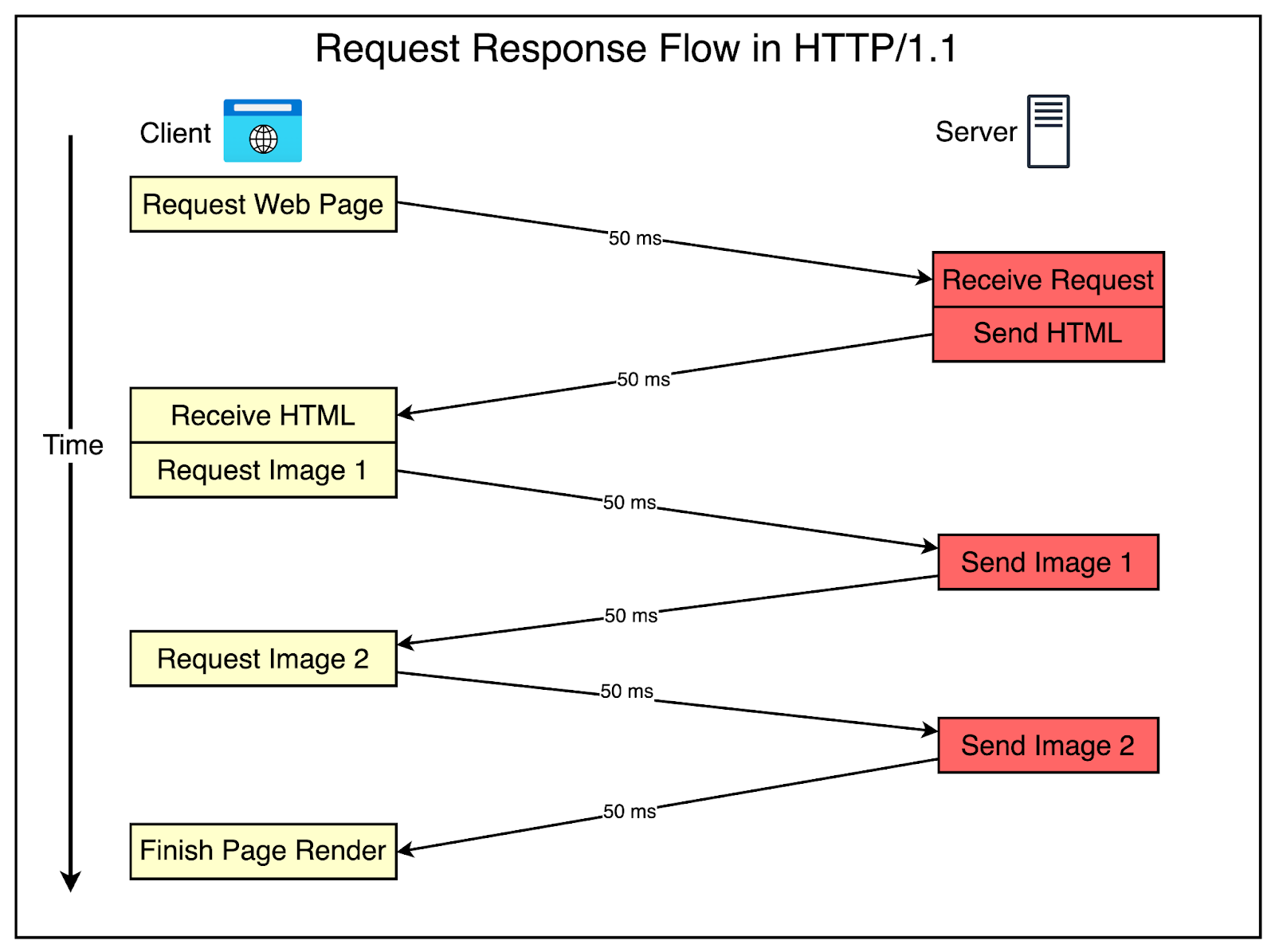
When the web application (on your browser) and the backend server (on some external server) communicate they use HTTP (Hypertext Transfer Protocol).
URLs
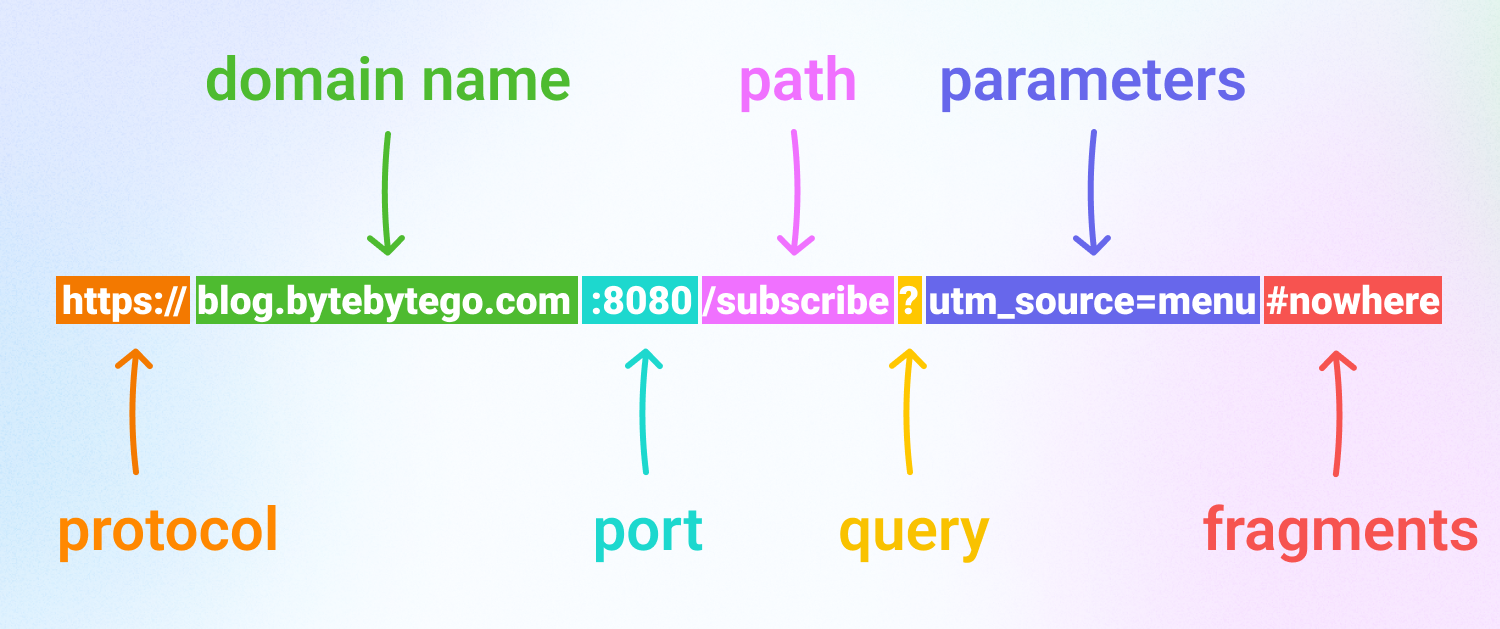
HTTP
- Request-response protocol
- A client makes a request, the server processes it and returns a response
- Stateless
- Any state should be included in the requests (e.g., in the cookies, as extra form parameters, in the path or querystring of the URL).
Message format
Request
VERB /path HTTP/version
Header: value
Header: value

(optional body)
Note: even if no body is present, a newline must follow the headers.
Response
HTTP/version status
Header: value
Header: value

(optional body)
Request methods (verbs)
Words that indicate the purpose of the request. They have each different semantics and the following list is their intended use case, nonetheless you could have an (ugly) web application using POSTs alone.
- GET: retrieve a resource
- POST: send data to a resource, may change state
- PUT: replaces a resource
- PATCH: modifies a resource
- DELETE: delete a resource
- OPTIONS: describe communication option for a resource
- HEAD: get GET response but without body (i.e., only the headers)
We will mostly concern ourselves with GET and POST.
Status code
Returned by the server.
Indicates what happened when processing the request.
Categories
- 1xx: Informational
- 2xx: Success
- 3xx: Redirection
- 4xx: Client errors
- 5xx: Server errors
Common status
- 200 OK: Request succeeded
- 302, 303, 307, 308: Redirect to another page
- 400 Bad Request: Content of the request was wrong
- 404 Not Found: Resource does not exist
- 500 Internal Server Error: Unexpected crash from the server
Note
It’s up to the server to pick a status to return. It could have went all wrong and return 200 OK still.
Headers
Metadata about the request and responses.
Many are standardized but you can include whatever header you want, it’s up to the server to do something with it.
Host (request)
The domain the client wants to access
Host: example.com
User-Agent (request)
Identification for the client app that’s doing the request (e.g., browser, curl, python)
User-Agent: Mozilla/5.0 (Windows NT 10.0; Win64; x64)
Set-Cookie (response)
Indicates a cookie that the client should associate with the server.
Set-Cookie: session=abc123; Path=/; HttpOnly; Secure
Cookie (request)
Cookies stored by the client.
Cookie: session=abc123
Authorization (request)
Authentication credentials for the server.
Authorization: Bearer eyJhbGciOiJIUzI1NiIsInR5cCI...
Content-Type (request and response)
Indicates the content type of the message body.
Content-Type: application/x-www-form-urlencoded
Location (response)
In server redirect responses, indicates the location to go to.
Location: https://example.com/login
Initial request
First you ask for a page.
GET / HTTP/1.1
Accept: */*
Accept-Encoding: gzip, deflate
Connection: keep-alive
Host: www.wikipedia.org
User-Agent: HTTPie/3.2.4
And you get it back.
HTTP/1.1 200 OK
accept-ranges: bytes
age: 35491
cache-control: s-maxage=86400, must-revalidate, max-age=3600
content-encoding: gzip
content-length: 26368
content-type: text/html
date: Sat, 22 Nov 2025 10:25:11 GMT
etag: W/"1bb6c-6426794fdf540"
last-modified: Thu, 30 Oct 2025 22:15:09 GMT
[snip…]

<!DOCTYPE html>
<html lang="en" class="no-js">
<head>
<meta charset="utf-8">
<title>Wikipedia</title>
<meta name="description" content="Wikipedia is a free online encyclopedia, created
and edited by volunteers around the world and hosted by the Wikimedia Foundation.">
[snip…]
The browser (probably) knows how to render the result data.
Further requests
All interactions with the server are further done with HTTP requests.
Logging in to a site:
POST /login HTTP/1.1
Host: example.com
Content-Type: application/x-www-form-urlencoded
Content-Length: 33

username=admin&password=secret123
We get a response:
HTTP/1.1 200 OK
Content-Type: application/json
Set-Cookie: session_id=ab34ff1290d...; Path=/; HttpOnly; Secure
The cookie is used in further requests to let the server know we have authenticated.
GET /account/profile HTTP/1.1
Host: example.com
Cookie: session_id=ab34ff1290da88f112233
HTTP/1.1 200 OK
Content-Type: text/plain; charset=utf-8

Hello, user admin
What’s on your browser
Your web browser supports many file formats. The main ones are HTML, CSS and JavaScript.
HTML
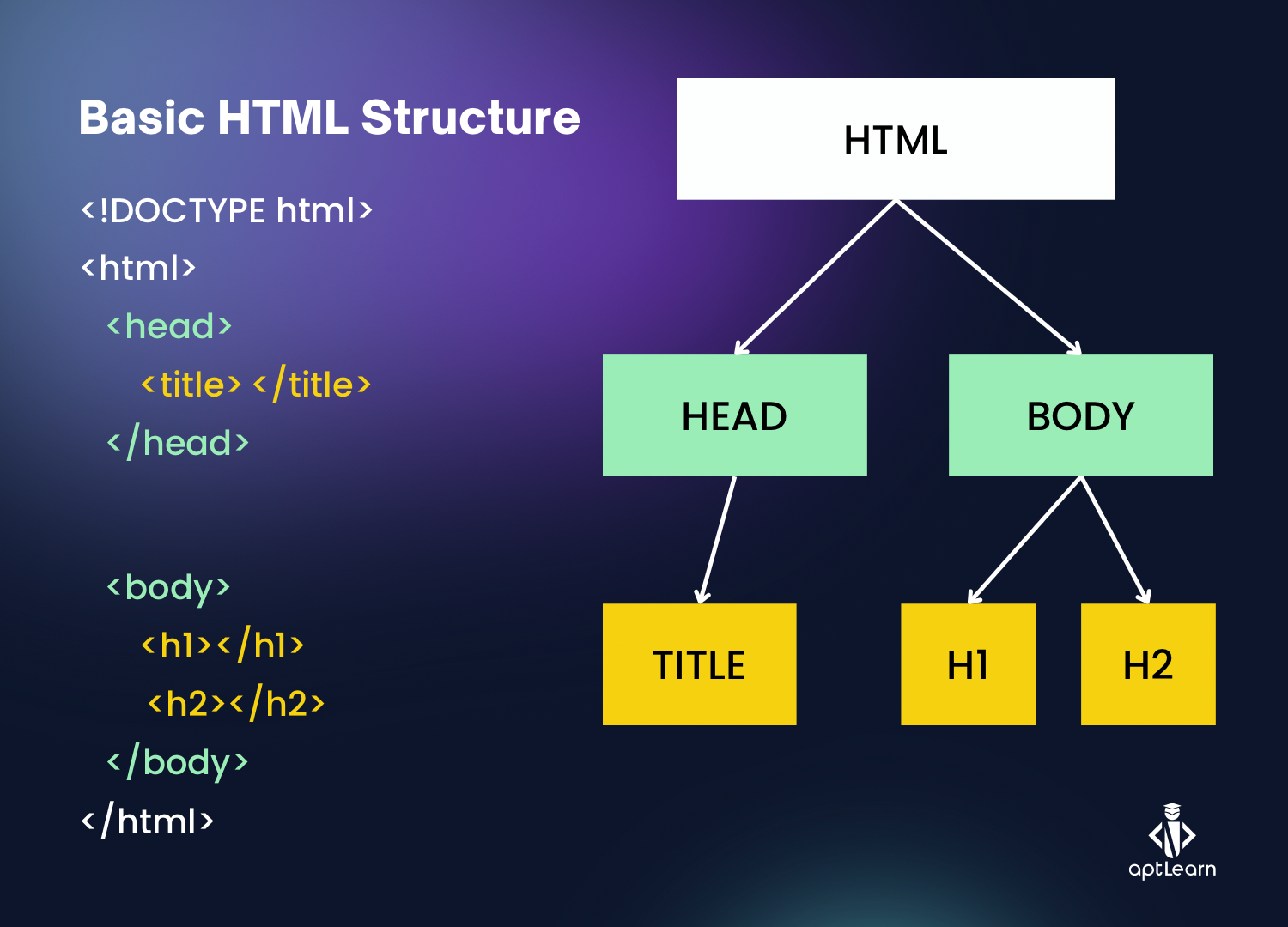
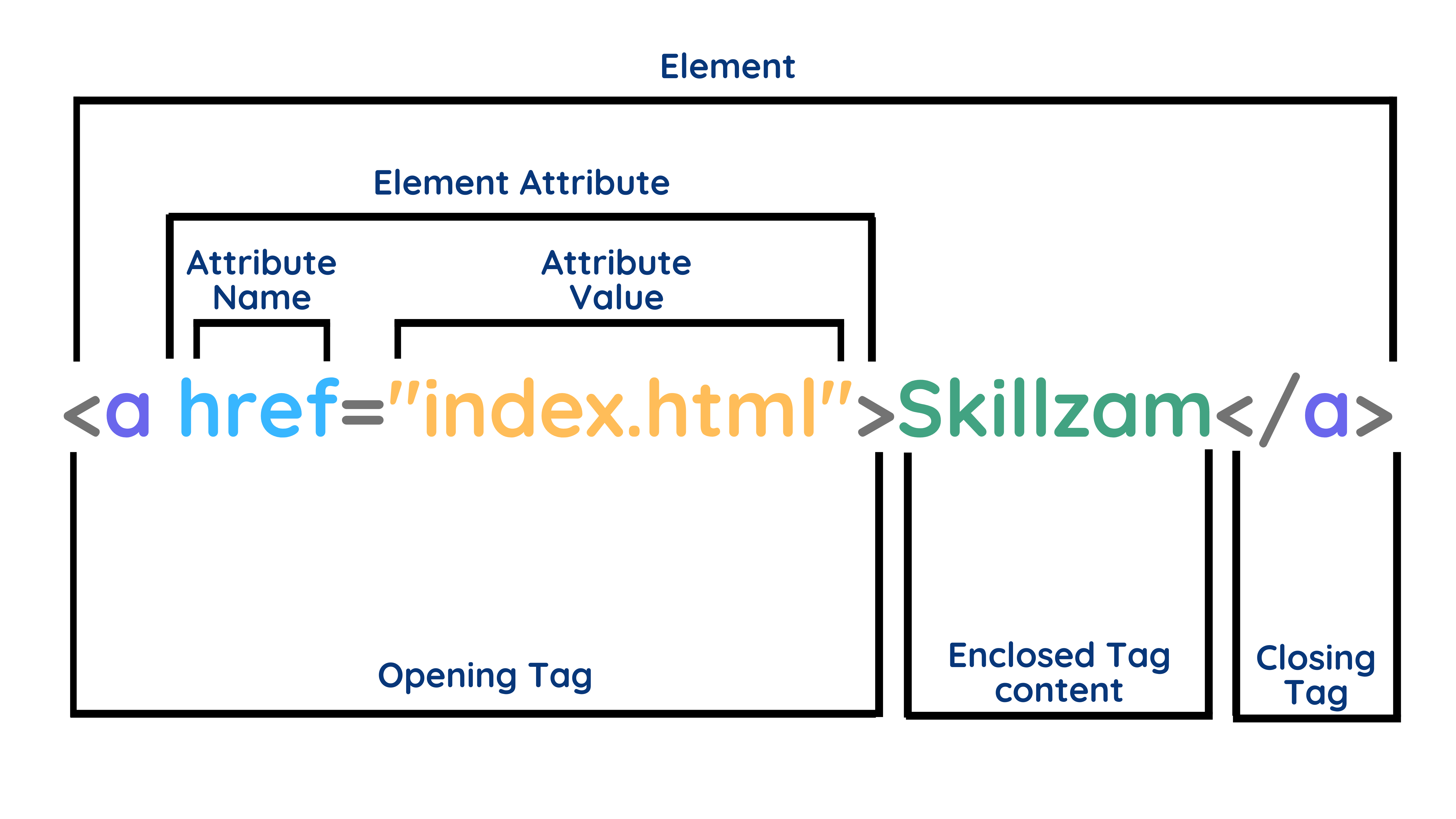
It specifies the structure of the page (text, images, buttons, input fields, etc) and the behaviours of some elements (e.g., buttons send some data to servers).
CSS
Controls the styling (e.g., color, layout, fonts) of the elements in the HTML.
JavaScript
Program code that runs on your browser and interacts with the HTML (e.g., receive events from the user, change the page structure) and can send data over to the server and receive the results.
HTML = structure
CSS = presentation
JavaScript = behaviour
Browser utilities
The browser has some utilities to inspect web pages.
- Right-click, view page source: View received HTML from server
- Developer console
- Inspector: View live view of the site, probably mutated by JS
- Console: Evaluate JS on current context
- Network: See HTTP requests done by the site
- Storage: See data stored by the browser about the site
The remote component
While your browser handles the frontend, the server handles the backend, the logic you don’t see.
This part may be written in any language that the server computer can execute (common choices are PHP, Python, and server side JavaScript itself).
Where is the data?
The remote server has to store the users data (e.g., mails, passwords, posts, messages) somewhere. It usually uses a SQL implementation.
The web server may do something like this to retrieve the users.
SELECT * FROM users
WHERE username = 'alice'
  AND password = 'password123';
Similar queries would be used to create a new user, change a user’s password, create a new post, and so.
Known files
There are some common files usually exposed by web servers.
We can use them to enumerate the service.
robots.txt
Tells bots which paths they are allowed/disallowed to visit.
Of course, the bots are able to ignore it.
Example
User-agent: *
Disallow: /admin
Disallow: /backup
Disallow: /internal-api
Disallow: /secret-panel
sitemap.xml
List URLs on the site to make indexing easier.
Example
<?xml version="1.0" encoding="UTF-8"?>
<urlset>
  <url>
    <loc>https://example.com/</loc>
  </url>
  <url>
    <loc>https://example.com/login</loc>
  </url>
  <url>
    <loc>https://example.com/admin</loc>
  </url>
  <url>
    <loc>https://example.com/api/v1/users</loc>
  </url>
  <url>
    <loc>https://example.com/dev-dashboard</loc>
  </url>
</urlset>
Commands
curl
Don’t. Prefer httpie, it’s friendlier.
http(pie)
Make HTTP(S) requests.
http [METHOD] URL [Header:value] [url_parameter==value] [form_attr=value]
HTTPie does POST JSON requests when given data, -f specifies
application/x-www-form-urlencoded.
http -f URL [form_attr=value]
You can show the sent request by using -v.
http -v URL
Much recommended.
katana
Crawls a page and returns the found URLs.
katana -u URL
Recommended to use some flags to juice it up.
katana -td -jc -d 10 -pc -kf all -u URL
Check the --help for explanations.
httrack
Create a mirror of a a website to the disk.
httrack URL
May be useful if you want to browse a website components offline. (Maybe grep? 👀)
Burp Suite
Soon™
Exercises
- Inspect HTML https://play.picoctf.org/practice/challenge/275
- where are the robots https://play.picoctf.org/practice/challenge/4
- head-dump https://play.picoctf.org/practice/challenge/476
- Includes https://play.picoctf.org/practice/challenge/274
- Local Authority https://play.picoctf.org/practice/challenge/278
- GET aHEAD https://play.picoctf.org/practice/challenge/132
- Cookie Monster Secret Recipe https://play.picoctf.org/practice/challenge/469
- Bookmarklet https://play.picoctf.org/practice/challenge/406
- Crack the Gate 1 https://play.picoctf.org/practice/challenge/520
- picobrowser https://play.picoctf.org/practice/challenge/9
- Insp3ct0r https://play.picoctf.org/practice/challenge/18
- dont-use-client-side https://play.picoctf.org/practice/challenge/66
Exercises (cont)
- login https://play.picoctf.org/practice/challenge/200
- logon https://play.picoctf.org/practice/challenge/46
- MatchTheRegex https://play.picoctf.org/practice/challenge/356
- Power Cookie https://play.picoctf.org/practice/challenge/288
- Roboto Sans https://play.picoctf.org/practice/challenge/291
- findme https://play.picoctf.org/practice/challenge/349
- Secrets https://play.picoctf.org/practice/challenge/296
- Cookies https://play.picoctf.org/practice/challenge/173
- Search source https://play.picoctf.org/practice/challenge/295
- Scavenger Hunt https://play.picoctf.org/practice/challenge/161
- Client-side-again https://play.picoctf.org/practice/challenge/69
Further learning
- pwn.college — Learn to Hack! https://pwn.college/