CTF Bootcamp S2: A series of tubes
This article adapts the bootcamp session notes into a readable post. View the slides.
Today
- OSI model
- TCP/IP model
- Network protocols
- IP
- TCP
- UDP
- FTP
- HTTP
- Hack time!
Tools
Install please:
- Wireshark
Networking
So, we need to send packets through the wire.
We use protocols for that.
We must define protocol mechanisms and message format.
Each protocol will provide different functions.
OSI model
Reference model for communication system components.
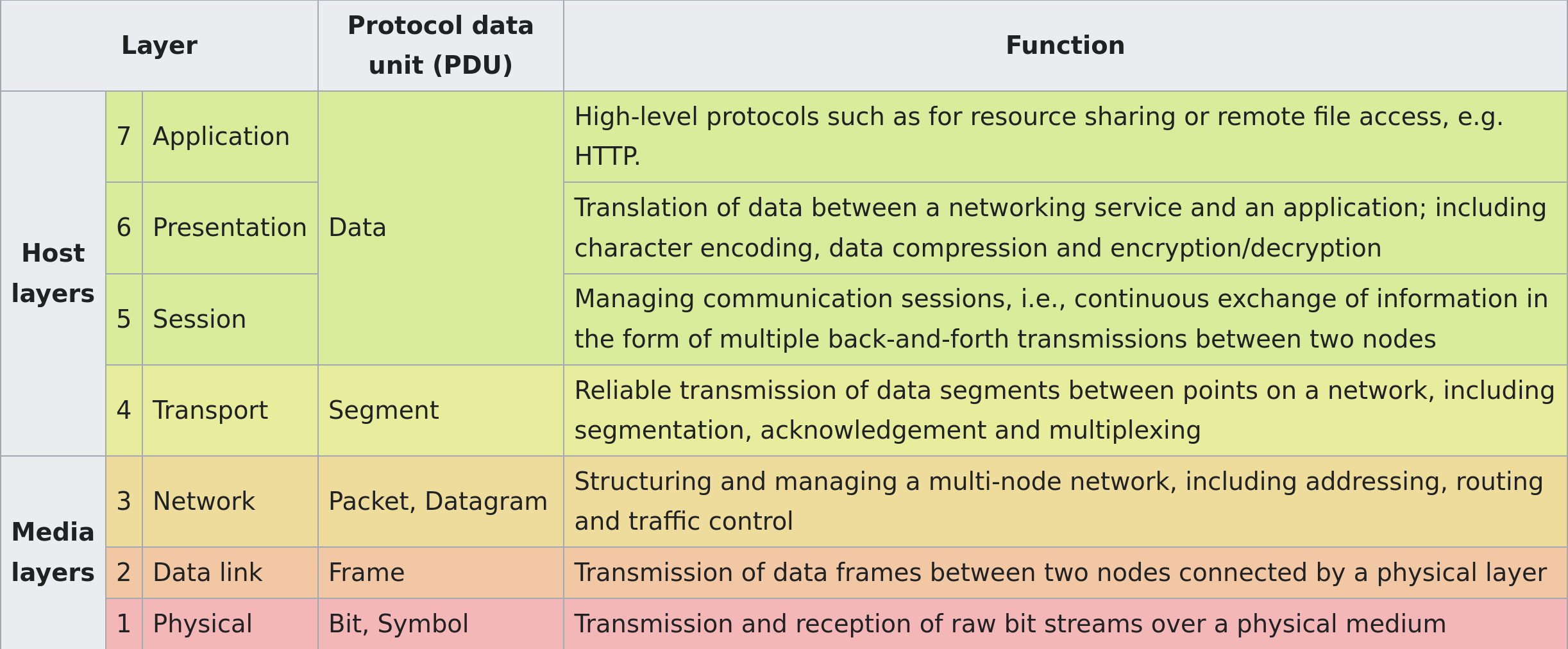
Is not actually implemented, that is, it's a conceptual separation of networking responsibilities for protocols.
Mostly used for talking about networks between informaticians.
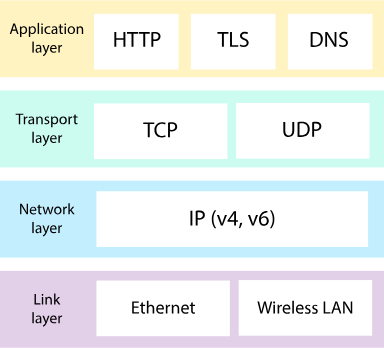
Internet protocol suite (aka TCP/IP)
Set of protocols used in the Internet (and LANs and so)
Encapsulation
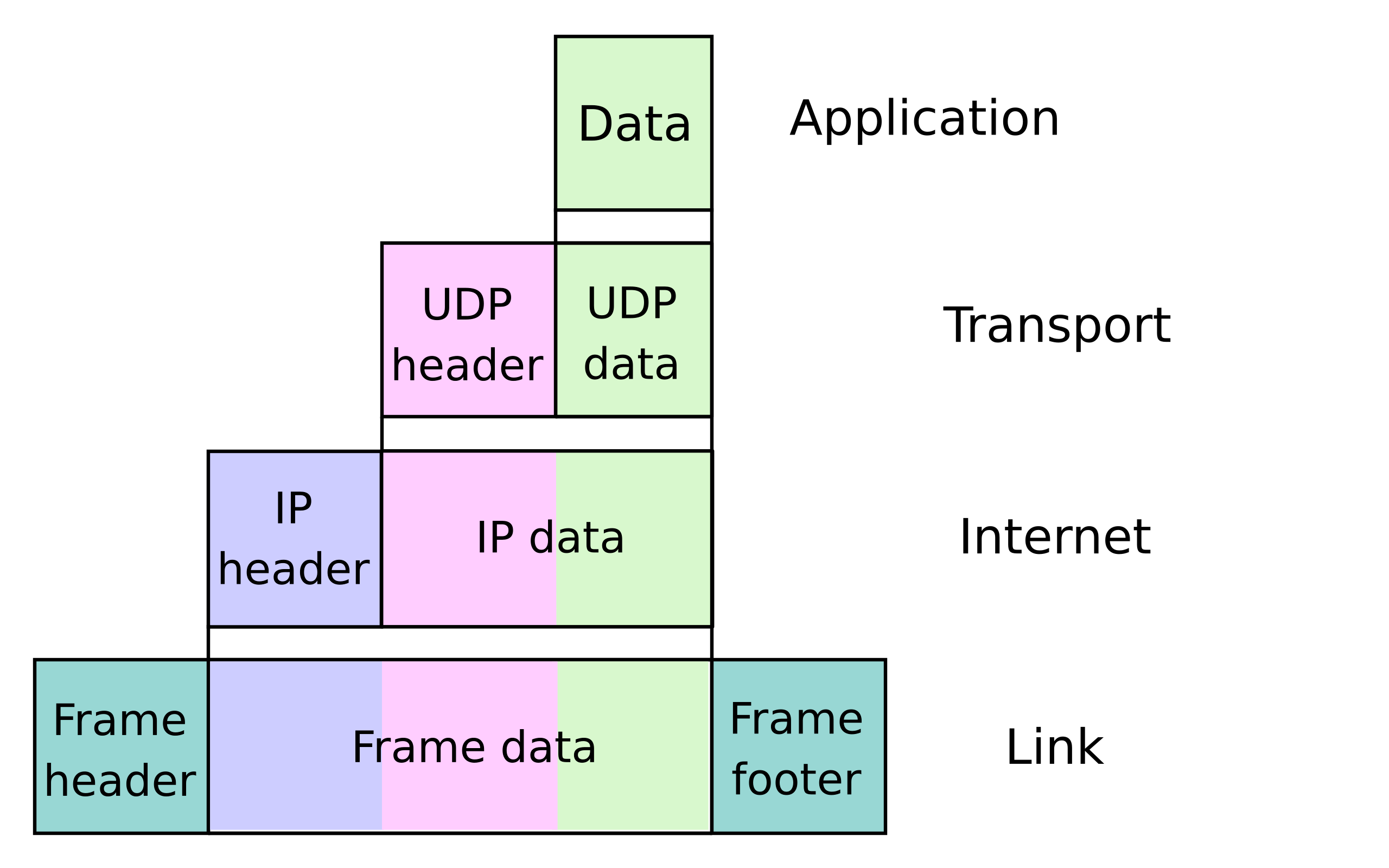
The message of each protocol is encapsulated, that is used as the payload of a lower protocol level.
The header and footer of the encapsulating protocol are concatenated to the bytes of the higher protocol.
Communication protocols
Define rules for two systems to transmit information between them.
Consists of syntax and semantics (like programming language).
The syntax defines the composition of the bytes that will be sent.
The semantics define what the bytes represent.
Ethernet
MAC address
48-bit identifier assigned to network interface controllers (NIC)—devices in computers that connect to a network—to use as an address in network communications.
They differentiate devices from one another in the same network.
Representation
Three common representations:
Six groups of two hexadecimal digits, separated by hyphens (-) in transmission order
01-23-45-67-89-AB
Six groups of two hexadecimal digits separated by colons (:)
01:23:45:67:89:AB
Three groups of four hexadecimal digits separated by dots (.)
0123.4567.89AB
Frame
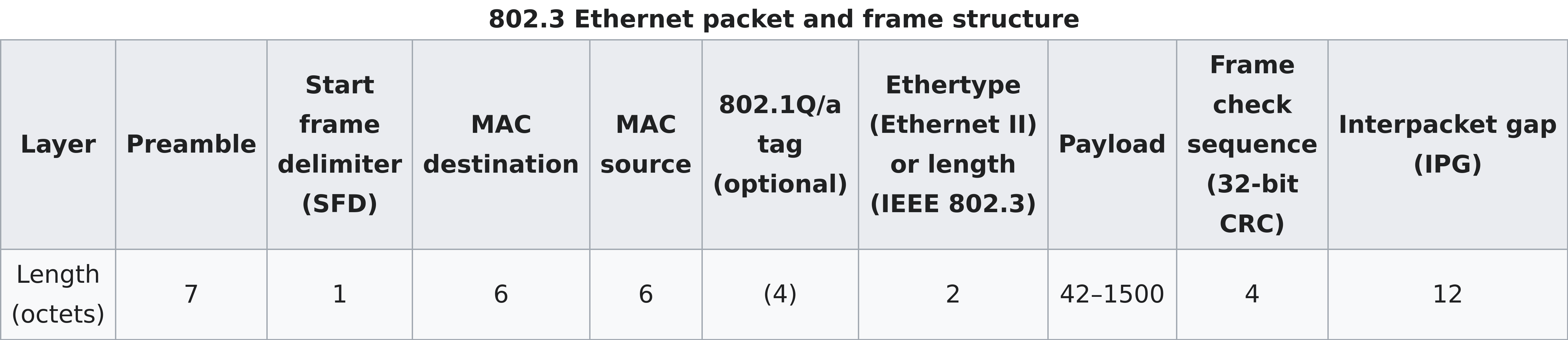
Preamble and SFD are used for synchronization.
MAC destination indicates the MAC of the destination device.
MAC source indicates the MAC of the source device.
Ethernet switching
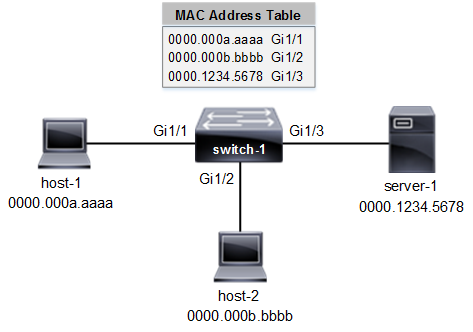
Computers create the Ethernet frame, send it through their NIC, and off they go.
It's responsability of the network infrastructure to make the frame reach its destination.
Usually, the frame are forwarded to switches until the target is reached.
IPv4
IPv4 address
IPv4 uses 32-bit addresses; 4_294_967_296 possible
addresses, though some are reserved for other purposes.
Most often written as four octets of the address expressed individually in decimal numbers separated by periods.
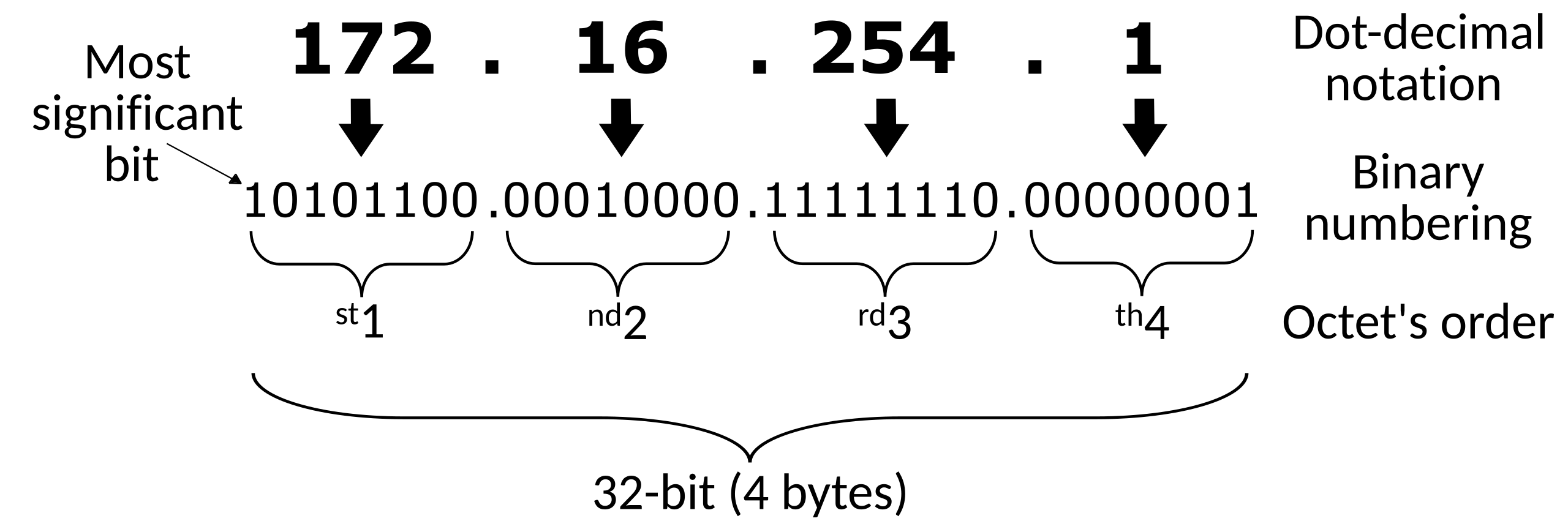
IPv4 packet
Consists of a header concatenated with the payload.
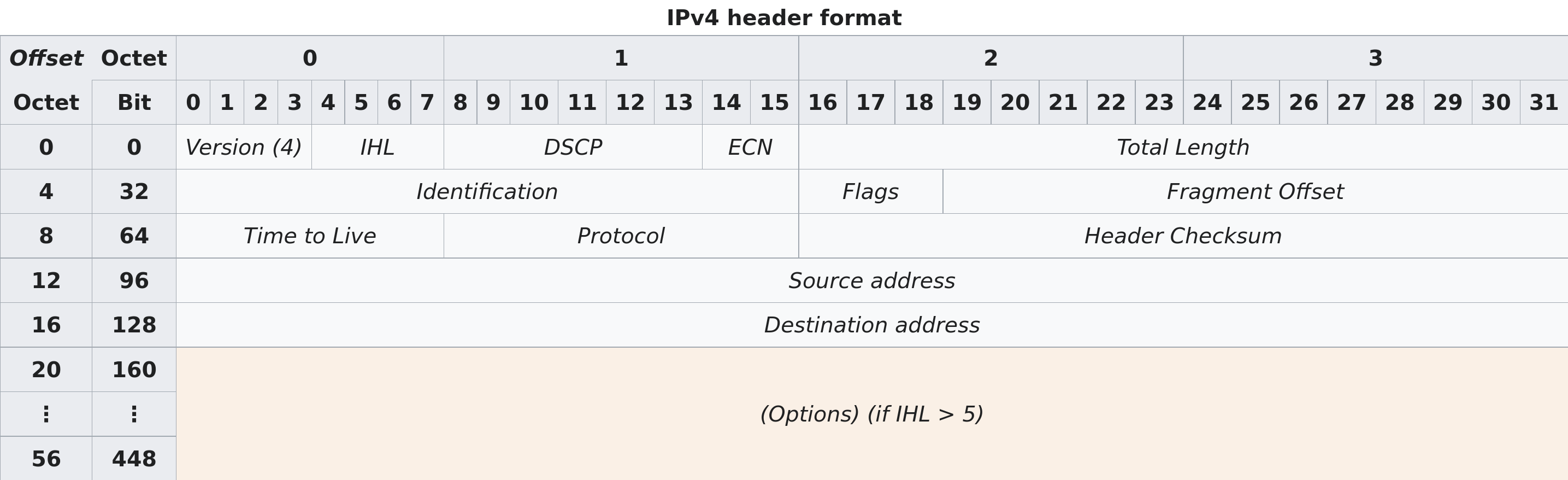
Source address: the IPv4 address of the sending device
Destination address: the IPv4 address of the destination device
Protocol: identifies the protocol of the contained payload
Time to Live (TTL): used to limit a datagram's lifetime
Routing
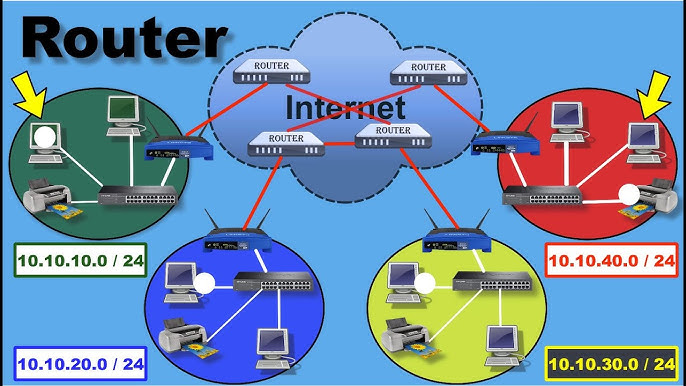
Each packet goes through routers that forward the packet to a router
that should be closer to the intended destination device
(Destination address).
Each time a router receives a packet, it decrements the TTL by one, if it reaches zero it discards it instead of forwarding it.
Why Ethernet and IPv4?
Ethernet handles the local routing, between immediately physically connected devices.
IPv4 (and IPv6) handles routing through multiple networks.
UDP
Very simple protocol, encapsulates application layer messages with a small header.
Ports
Within an operating system, a port identifies a specific application or service on a device.
As such, many ports may be in use by multiple applications or even one alone.
Port number
A port is identified by a 16-bit integer, usually written a 16-bit integer.
e.g., 22, 80
Well-known and registered ports
Several port numbers are associated with specific network services.
Applications interacting with those services default to using the known port number.
Nonetheless, they are a suggestion only, any network service can run through any of the valid 65536 port numbers.
| Port | TCP | UDP | Description |
|---|---|---|---|
| 21 | Yes | FTP control | |
| 22 | Yes | SSH | |
| 53 | Yes | Yes | DNS |
| 80 | Yes | Yes | HTTP |
| 443 | Yes | Yes | HTTP over TLS |
UDP datagram
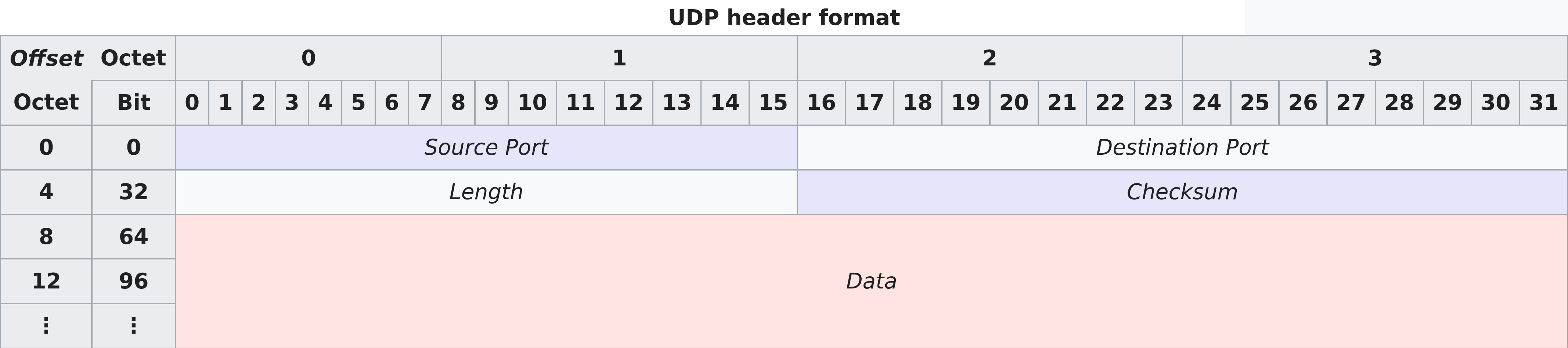
Source port: identifies the sender's port
Destination port: identifies the receiver's port
Length: length in bytes of the UDP datagram (header + payload)
TCP
As with UDP, it encapsulates application layer messages.
But it provides many more features and as such is quite more complicated.
TCP datagram
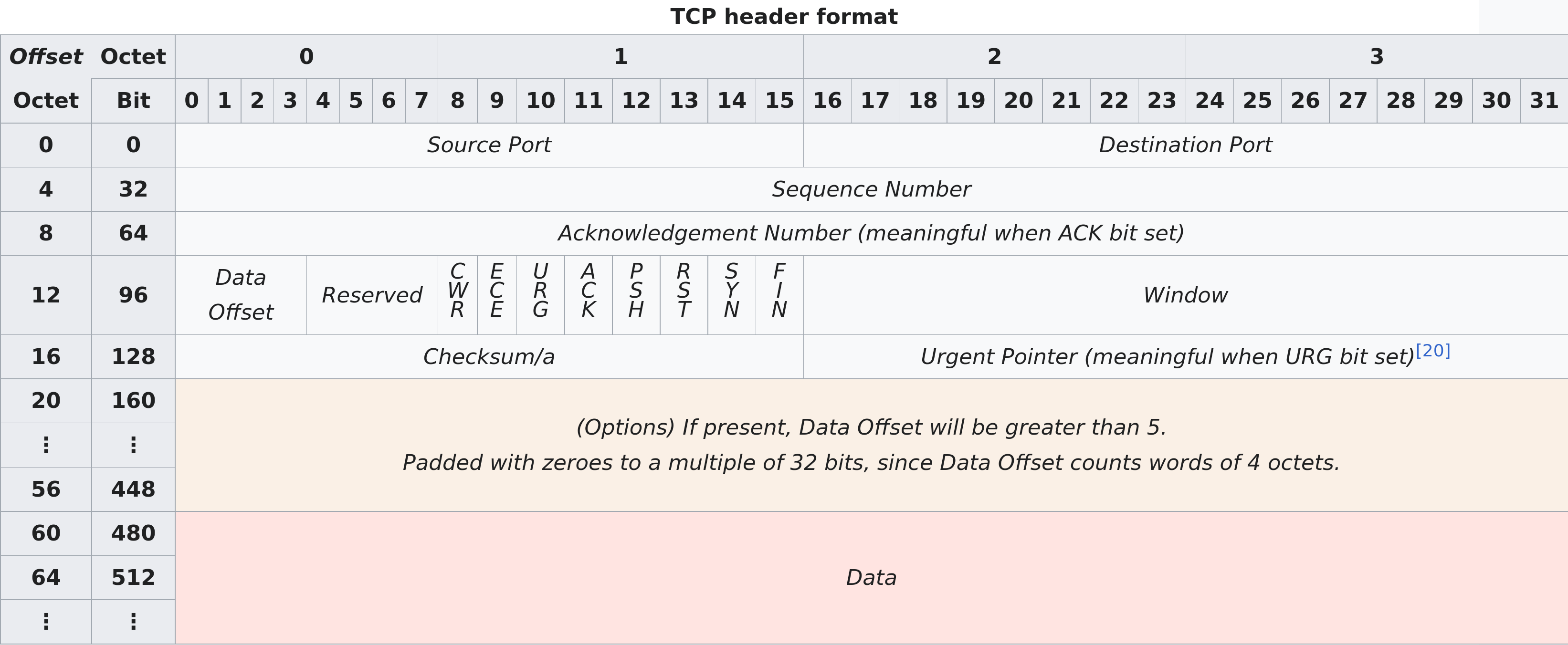
Source port: identifies sending port
Destination port: identifies receiving port
Sequence number: used to identify the order of the data
Acknowledgment number: used to indicate receipt of data
ACK: Indicates acknowledgment
SYN: Indicates initial sequence number
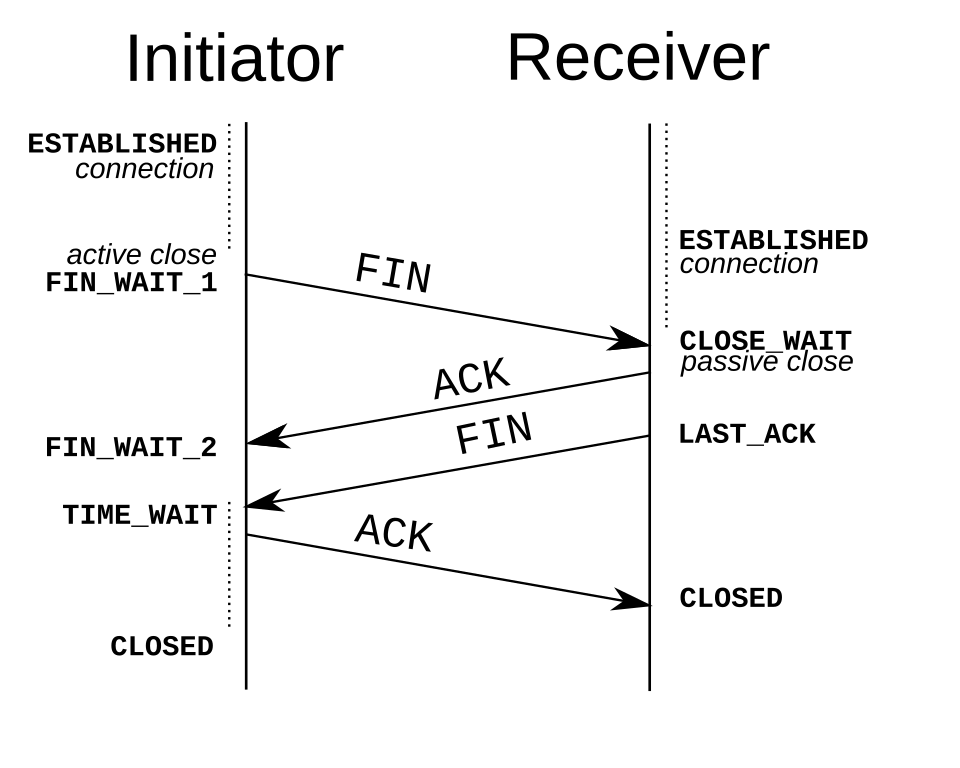
FIN: Indicates it's the last packet from the sender
Handshake
Establishes the sequence numbers to use in the transmission.
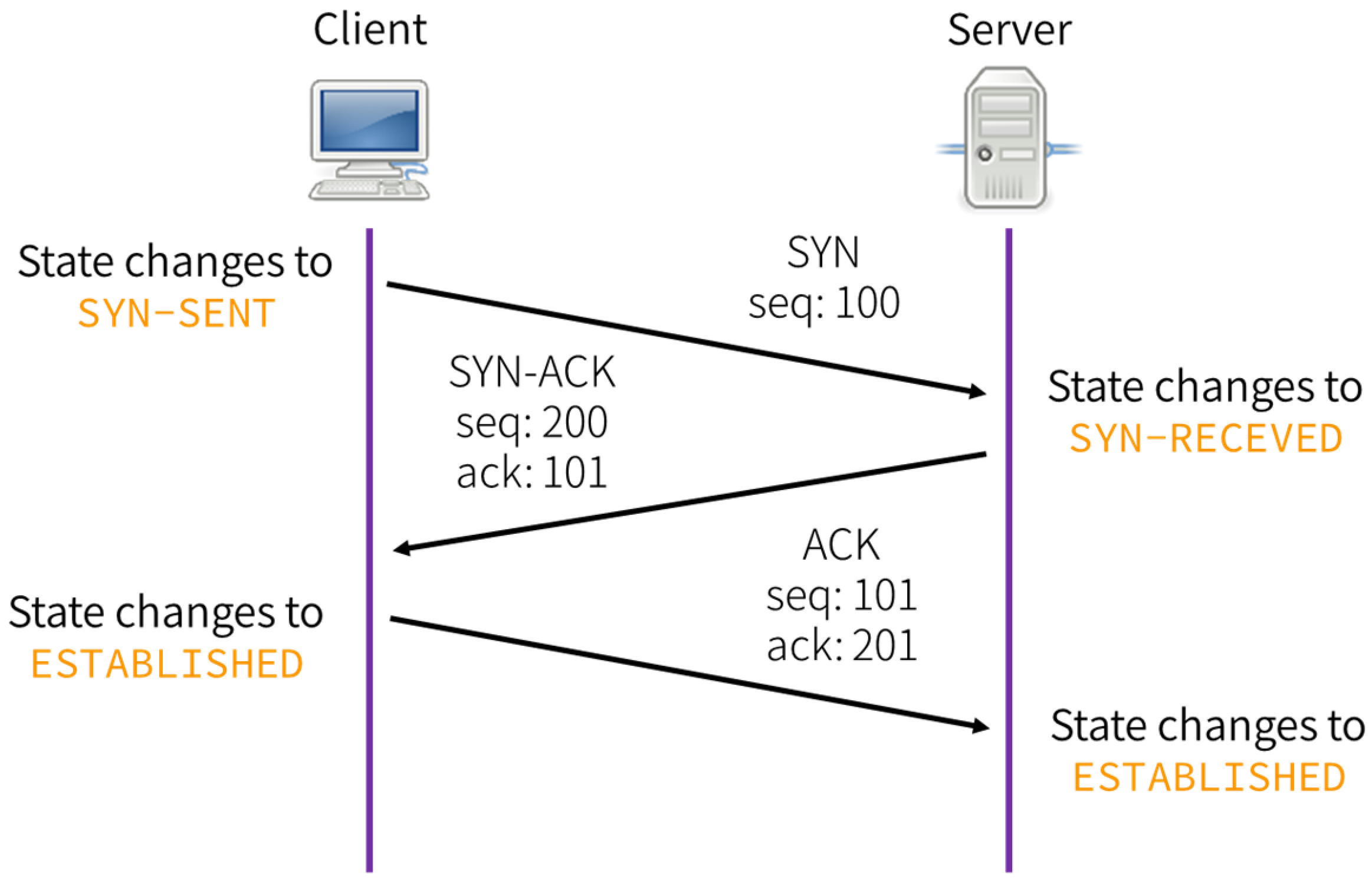
This is why TCP is called connection-oriented. All data transmission in this TCP connection will continue from the sequence numbers decided in this step.
Data transmission
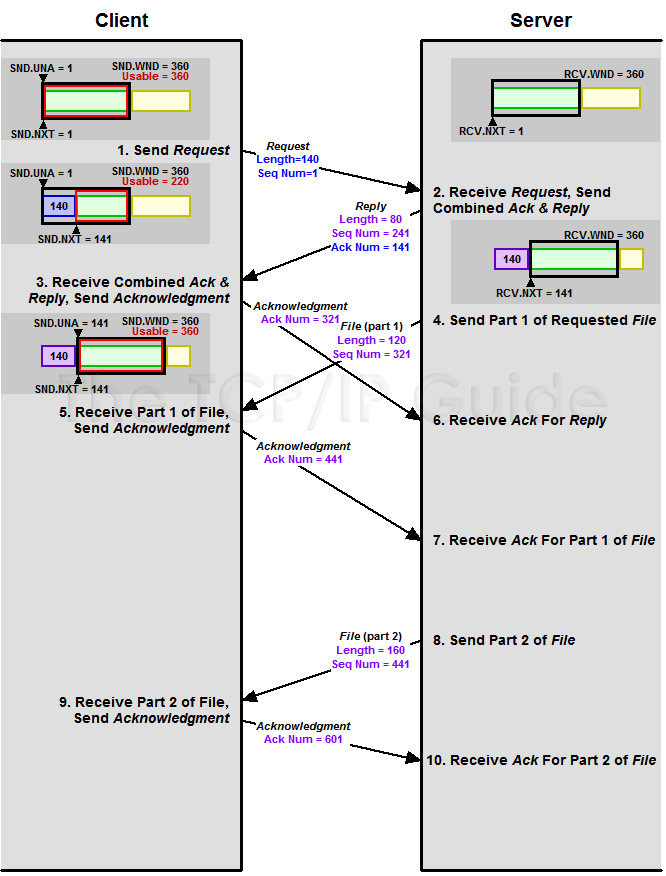
Each packet sent is answered back with a packet ACKnowledging that the data was received.
ACK number = sequence number of received segment + length of received data (SYN and FIN each consume one sequence number)
Connection termination
TCP vs UDP
TCP handles a connection of bytes transferred between sender and receiver. UDP sends messages.
TCP has error-correction, flow control, delivery guarantees, etc. UDP has no such things.
As such, an application talking through UDP must implement such features if needed necessary (e.g., QUIC over UDP).
HTTP
Further explained in next session.
Consists of a request answered by a response from the server.
Request
METHOD /path HTTP/version
Header-Name: value
Header-Name: value

[optional body]
GET / HTTP/1.1
Accept: */*
Accept-Encoding: gzip, deflate
Connection: keep-alive
Host: github.com
User-Agent: HTTPie/3.2.4Response
HTTP/version status_code status_text
Header-Name: value
Header-Name: value

[optional body]
HTTP/1.1 301 Moved Permanently
Content-Length: 0
Location: https://github.com/Commands
wireshark
Interactively dump and analyze network traffic
wireshark PCAP
Find
CTRL-f
Write string or bytes.
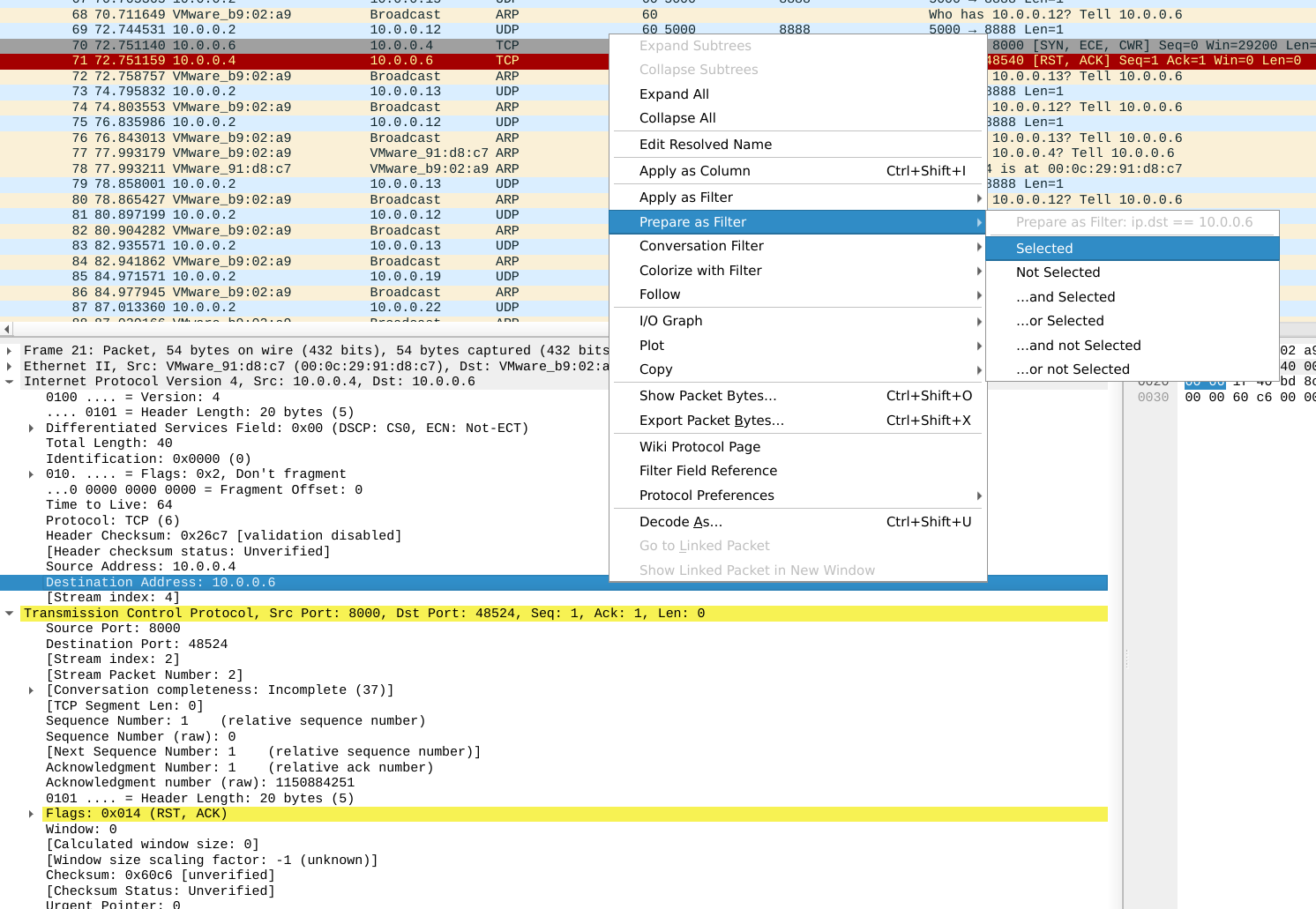
Filters
Write something on Apply a display filter.
You can select a field from the dissection window to filter on that value.
Follow stream
Right-click on packet, Follow -> TCP/UDP.
Statistics
At Wireshark toolbar, Statistics
Particularly Endpoints and
Protocol Hierarchy
Extract objects
At Wireshark toolbar, File -> Export Objects, select protocol to export from.
reordercap
Reorder input file by timestamp into output file
reordercap INFILE OUTFILE
Exercises
PcapPoisoning https://play.picoctf.org/practice/challenge/362?category=4&page=2&solved=0
Packets Primer https://play.picoctf.org/practice/challenge/286?category=4&page=3
shark on wire 1 https://play.picoctf.org/practice/challenge/30?category=4&page=5
Ph4nt0m 1ntrud3r https://play.picoctf.org/practice/challenge/459?category=4&page=1&solved=0
Wireshark doo dooo do doo… https://play.picoctf.org/practice/challenge/115?category=4&page=4
FindAndOpen https://play.picoctf.org/practice/challenge/348?category=4&page=2&solved=0
Exercises (Extra)
Eavesdrop https://play.picoctf.org/practice/challenge/264?category=4&page=4
Trivial Flag Transfer Protocol https://play.picoctf.org/practice/challenge/103?category=4&page=5
Further learning
- pwn.college — Learn to Hack! https://pwn.college/
- CCNA: Introduction to Networks https://www.netacad.com/courses/ccna-introduction-networks?courseLang=en-US
- Free CCNA v1.1 200-301 | Complete Course 2026 https://www.youtube.com/playlist?list=PLxbwE86jKRgMpuZuLBivzlM8s2Dk5lXBQ